
Streamline AEM Development with Auto-Reload
Overview
The AEM Front Module extension for NPM is designed to enhance the development workflow for AEM developers working with dynamic web content. By integrating directly with the AEM Front module, this tool eliminates the need for manual page reloads after code deployments to the AEM instance. This addresses a common pain point in AEM development, where changes require a full refresh to take effect, disrupting workflow continuity.
Target users include professional AEM developers, frontend engineers, and technical teams managing content-heavy enterprise websites. The tool is especially useful during iterative development cycles, where frequent code updates are deployed and tested. Real-world scenarios include editing components, adjusting templates, or refining styling in a live environment, where rapid feedback is critical.
Developed by Kevin W., the extension is built with developer productivity in mind. It operates as a browser-based utility that enhances the interaction between the developer’s local environment and the AEM instance. While no additional developer background is provided, the tool’s focused functionality suggests a practical, experience-driven design.
Key Features & Capabilities
- Auto-Reload Trigger via Keyboard Shortcut – Pressing
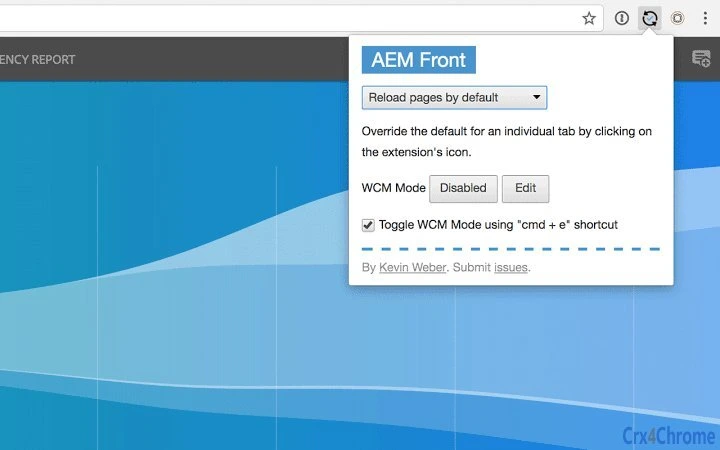
cmd + etoggles between WCM Mode “disabled” and “edit” on the current page. This allows developers to quickly switch contexts without manual navigation or page refreshes. - Context-Aware Mode Switching – The extension automatically detects the current WCM mode and switches to the opposite state. If on an “edit” page, it switches to “disabled” mode, and vice versa, streamlining workflow transitions.
- Configurable Popup Interface – Clicking the extension icon opens a popup with multiple configuration options. This enables users to customize behavior based on their development environment or project requirements.
- Integration with AEM Front Module for NPM – The tool is designed to work exclusively with the AEM Front module, ensuring compatibility and consistent behavior across development setups.
- Focus-Based Activation – The keyboard shortcut only works when the page is focused. If the shortcut fails, users are prompted to click on the page to ensure focus, improving reliability.
These features collectively reduce friction in the development cycle. For example, a developer can switch from editing to preview mode instantly, test layout changes, and return to edit mode without reloading the page. This supports faster iteration and more efficient debugging, especially in complex AEM projects with multiple components.
User Interface, Workflow & Performance
The extension features a minimal, icon-based user interface that integrates seamlessly into the browser toolbar. The icon serves as the primary access point, with a popup window appearing upon click. The popup contains configuration options, allowing users to adjust behavior without leaving the development environment.
Navigating the tool is straightforward: users simply click the icon to open settings or use the keyboard shortcut to toggle modes. The workflow is optimized for speed and precision, aligning with the fast-paced nature of frontend development. The tool does not interfere with the browser’s default behavior, maintaining a clean and unobtrusive presence.
Performance details were not specified by the developer. However, given its small size (1.2 MB) and browser-based architecture, it is expected to have minimal impact on system resources. The developer did not provide information on CPU or RAM usage, nor did they include details on stability under heavy usage. General software behavior suggests low-latency response to user input, but exact performance metrics remain unverified.
Compatibility & System Requirements
The extension is compatible with both Mac and Windows operating systems, making it accessible to developers across major desktop platforms. It is designed to function within modern web browsers that support browser extensions, though specific browser versions are not listed.
The installation size is 1.2 MB, indicating a lightweight footprint. The software version is 1.0.0, suggesting a stable initial release. The developer did not specify additional system requirements, such as minimum RAM, processor speed, or browser version compatibility.
Exact system requirements were not listed. Compatibility information was partially provided. Users are advised to ensure their development environment includes the AEM Front module for NPM, as the extension depends on this integration to function.
Pros and Cons
Pros
- Eliminates manual page reloads after code deployment
- Efficient keyboard shortcut for rapid mode switching
- Minimal interface with easy access to settings
- Small file size (1.2 MB) reduces installation impact
- Free to use with no licensing restrictions
Cons
- Requires AEM Front module for NPM to function
- Dependent on browser focus for keyboard shortcut to work
- No detailed documentation or user guides provided
- Platform compatibility limited to Mac and Windows
- Performance and stability data not publicly available
FAQ Section
Is this extension compatible with all browsers?
The extension is designed for modern browsers that support extensions, but specific browser compatibility was not listed. It is recommended to use it with browsers commonly used in AEM development environments.
Is the extension safe to use with production AEM instances?
The extension is intended for development workflows and should be used with caution in production environments. It is not recommended for use on live, production AEM instances due to potential unintended mode changes.
How often does the extension receive updates?
Update frequency is not specified. Users should monitor the official release page for new versions and improvements.
What license type does this tool use?
The tool is free to use and distributed without licensing fees. No formal license terms were provided in the available information.
Can I use this extension offline?
The extension requires an active connection to the AEM instance and the AEM Front module for NPM to function. It cannot operate fully in offline mode.
Final Thoughts
The AEM Front Module extension significantly improves the developer experience by automating one of the most repetitive tasks in AEM development: manual page reloading. Its intuitive design, lightweight footprint, and seamless integration with the AEM Front module make it a valuable addition to any AEM developer’s toolkit.
While it has limitations—such as dependency on a specific module and lack of detailed documentation—it delivers on its core promise: faster, smoother development cycles. The free pricing model enhances its accessibility for teams of all sizes.
For AEM developers seeking to boost productivity and reduce workflow friction, this tool offers a practical, no-frills solution. Download AEM Front Module extension now.







